HDMI Versions Explained: 1.4, 2.0, 2.1 and 2.2
Understand what changed between HDMI versions, what the bandwidth numbers mean, and which port and cable details to verify for a TV, console, or monitor.
Read the version as a specification, not a product promise
HDMI is a digital connection for video, audio, and related control data. A version number describes a revision of the HDMI specification. It does not tell you that a particular TV, GPU, console, receiver, or monitor implements every optional feature or the highest possible link rate. HDMI Licensing Administrator tells buyers to check the actual advertised features and bandwidth instead of relying on a version number alone.
For a purchase decision, ask what you want to run—4K 60Hz, 4K 120Hz with HDR and VRR, or something more demanding—and look for that exact mode on the specific input and output. The table below lists specification ceilings, not minimum requirements that every device bearing a version label must meet.
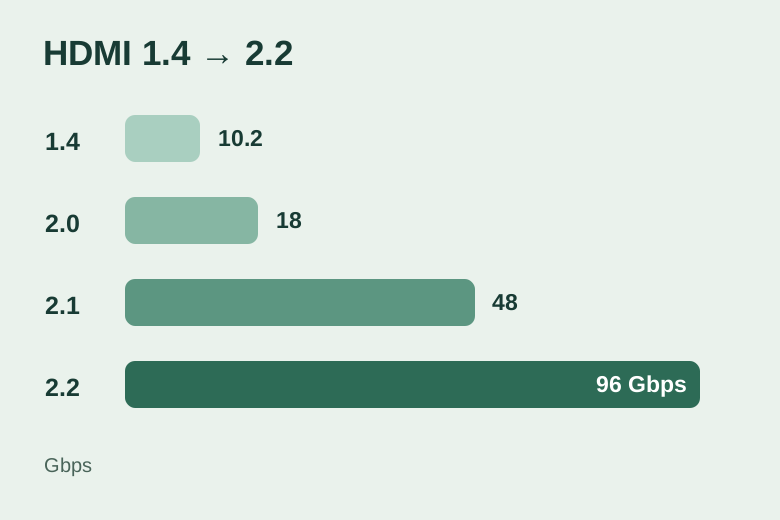
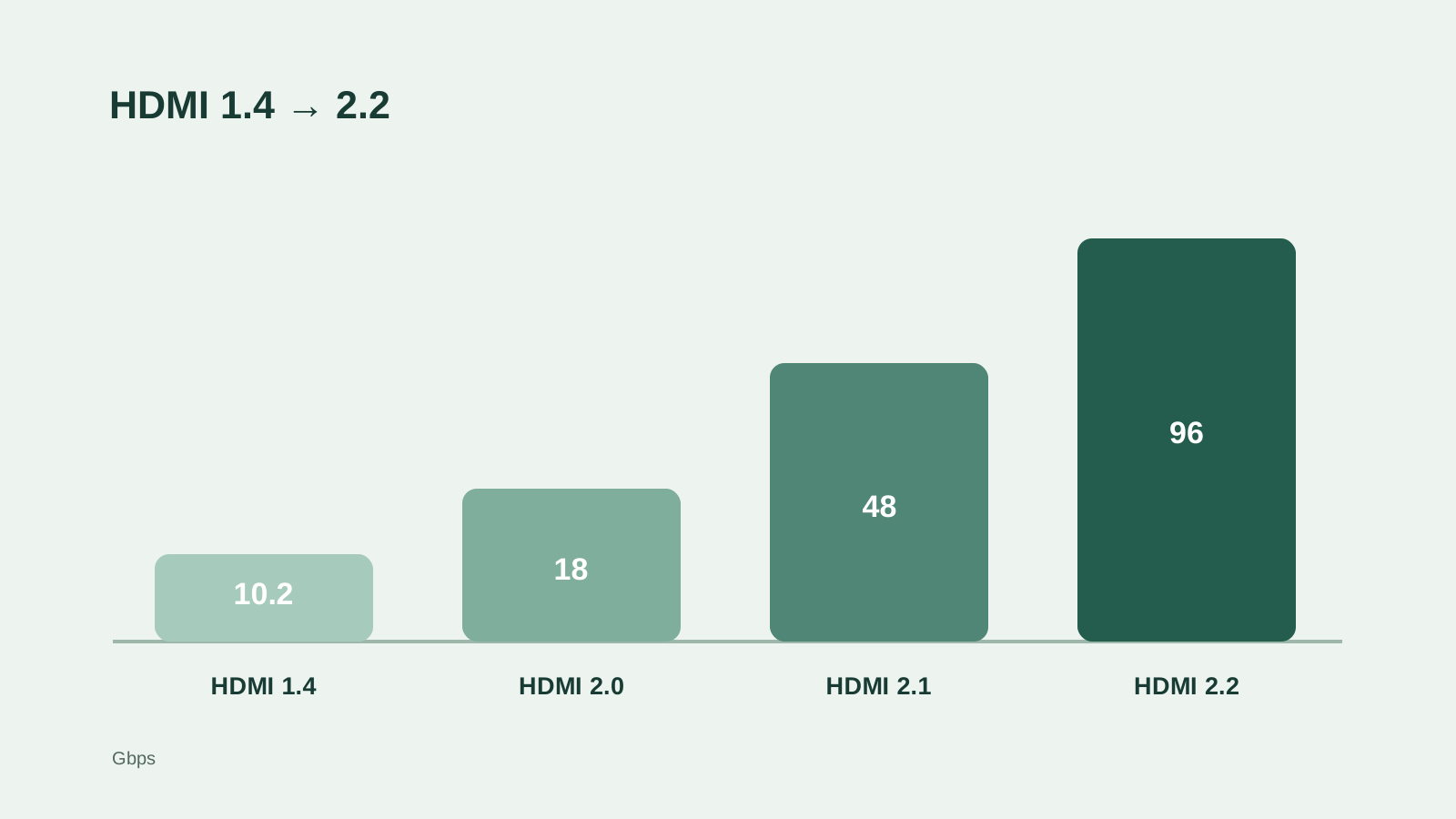
Maximum raw link rates by HDMI specification generation
| Specification | Maximum raw rate | What changed | Typical buyer check |
|---|---|---|---|
| HDMI 1.4 | 10.2 Gbps | 4K at up to 30Hz became possible | Check 4K/30 vs 4K/60 |
| HDMI 2.0 | 18 Gbps | Higher link rate for 4K at 60Hz | Check chroma and HDR at 4K/60 |
| HDMI 2.1 | 48 Gbps | FRL enables higher-rate modes; eARC, VRR and ALLM are specified | Check actual port rate and supported features |
| HDMI 2.2 | 96 Gbps | Higher FRL ceiling and Ultra96 cable class | Check Ultra96 support and actual device capability |
These are specification maxima. A device may implement less. Video format, bit depth, chroma, blanking and compression affect whether a particular mode fits.
HDMI 1.4 and 2.0: when an older port is enough
HDMI 1.4 is associated with a 10.2 Gbps ceiling and 4K at up to 30Hz. It can still be perfectly adequate for 1080p use or an older display, but a 4K desktop at 30Hz often feels much less responsive than 60Hz. If a device shows 4K but only offers 30Hz, inspect its port and cable path before blaming the panel.
HDMI 2.0 raised the maximum raw rate to 18 Gbps and supports 4K at 60Hz under suitable signal settings. It remains useful for many TVs, streaming devices and office monitors. Do not infer that every 4K/60 HDR combination has the same bandwidth need: 8-bit versus 10-bit color and 4:4:4 versus 4:2:0 chroma make a difference.
HDMI 2.1: 4K high refresh and feature checks
HDMI 2.1 increased the specification ceiling to 48 Gbps and introduced Fixed Rate Link (FRL) for demanding video modes. The specification includes 4K at 120Hz and 8K at 60Hz scenarios, as well as features such as eARC for TV audio return, VRR for variable gaming frame rates, and ALLM for automatic low-latency mode. Which of these work on your setup depends on the products, their exact ports, and sometimes firmware.
A TV may have several HDMI inputs with different capabilities. One might be the eARC port, while a different input may be the best choice for a console. Before buying, confirm the input-specific mode table and count the number of ports that support all the devices you plan to connect.
HDMI 2.2: know the new ceiling without assuming a new device has it
The HDMI 2.2 specification raises the maximum raw link rate to 96 Gbps. HDMI Licensing Administrator lists demanding examples such as uncompressed 4K at 240Hz and 8K at 60Hz with full chroma at 10- or 12-bit color. It also defines the Ultra96 HDMI Cable for up to 96 Gbps systems. These examples describe what the specification can support; they are not a guarantee for every product sold with an HDMI 2.2-associated feature.
Most buyers do not need to replace a working 4K 60Hz or 4K 120Hz setup just because a newer HDMI specification exists. Upgrade only when your source and screen both support a mode you need and your present path cannot deliver it.
Which HDMI cable should you look for?
Choose the cable class for the bandwidth the complete setup requires. Premium High Speed HDMI Cables are specified for up to 18 Gbps systems, Ultra High Speed HDMI Cables for up to 48 Gbps, and Ultra96 HDMI Cables for up to 96 Gbps. A certified cable helps establish that the cable meets its test program. It cannot turn an HDMI 2.0 port into a 2.1-capable output.
HDMI guidance does not allow cables to be marketed by an HDMI specification version number alone. Treat “HDMI 2.1 cable” as an imprecise retail phrase; look for the official cable class and certification label. For a long run, switch, receiver or wall plate, verify that every middle component supports your target mode.
A practical choice by display goal
For 1080p or 4K at 60Hz, many existing HDMI paths are enough; use the display’s manual to confirm the exact mode. For a 4K 120Hz console or gaming PC, verify FRL-capable HDMI output and input, VRR where desired, and an appropriate cable. For 4K 240Hz uncompressed full-chroma modes, inspect real HDMI 2.2/Ultra96 support and device specifications rather than buying by a headline number.
If your screen is a PC monitor with both HDMI and DisplayPort, compare their mode tables side by side. Our HDMI vs DisplayPort guide explains that choice, while the resolution versus refresh-rate guide helps decide whether the higher mode is useful to you in the first place.
Sources and calculation references
- HDMI Licensing Administrator: HDMI 2.2 specification overview
Maximum rate, supported examples, FRL, cable classes and version-number usage; checked September 2026.
- HDMI Licensing Administrator: specification generation overview
HDMI 1.4 through 2.2 maximum raw bandwidth comparison.
- HDMI Forum: HDMI 2.0 specification announcement
18 Gbps maximum and 4K 50/60 support.
- HDMI Forum: HDMI 2.1 specification announcement
48 Gbps generation and 4K/120, 8K/60 capabilities.
- HDMI Licensing Administrator: cable categories and bandwidth
Premium High Speed and Ultra High Speed cable classes.
FAQ
Does an HDMI 2.1 label guarantee 48 Gbps?
No. The specification supports up to 48 Gbps, but a product’s implemented link rate and features must be checked in its own specification.
Do I need HDMI 2.1 to watch HDR movies?
Usually not. Many HDR movie and 4K 60Hz setups work through earlier HDMI configurations. High-refresh gaming modes and features such as VRR are more likely to require a newer, explicitly supported path.
Should I buy an Ultra96 cable for an HDMI 2.0 TV?
An Ultra96 cable is backward compatible, but its higher rating cannot make an 18 Gbps HDMI 2.0 port transmit at 96 Gbps. Buy for the modes your devices can actually use.
Related guides
Connections and display setup
HDMI vs DisplayPort: Which Connection Should You Use?
Connections and display setup
DisplayPort Versions Explained: 1.2, 1.4, 2.0 and 2.1
HDR guides
How Many Nits Do You Need for HDR?
Monitor guides
Resolution vs Refresh Rate: 4K 60Hz or 1440p 144Hz?
TV guides
TV Size and Viewing Distance Calculator