How Many Nits Do You Need for HDR?
A practical HDR brightness guide for TVs and monitors, covering nits, DisplayHDR tiers, OLED vs Mini LED, HDR formats, gaming refresh rates, and HDMI ports.
Quick answer: how many nits are enough for HDR?
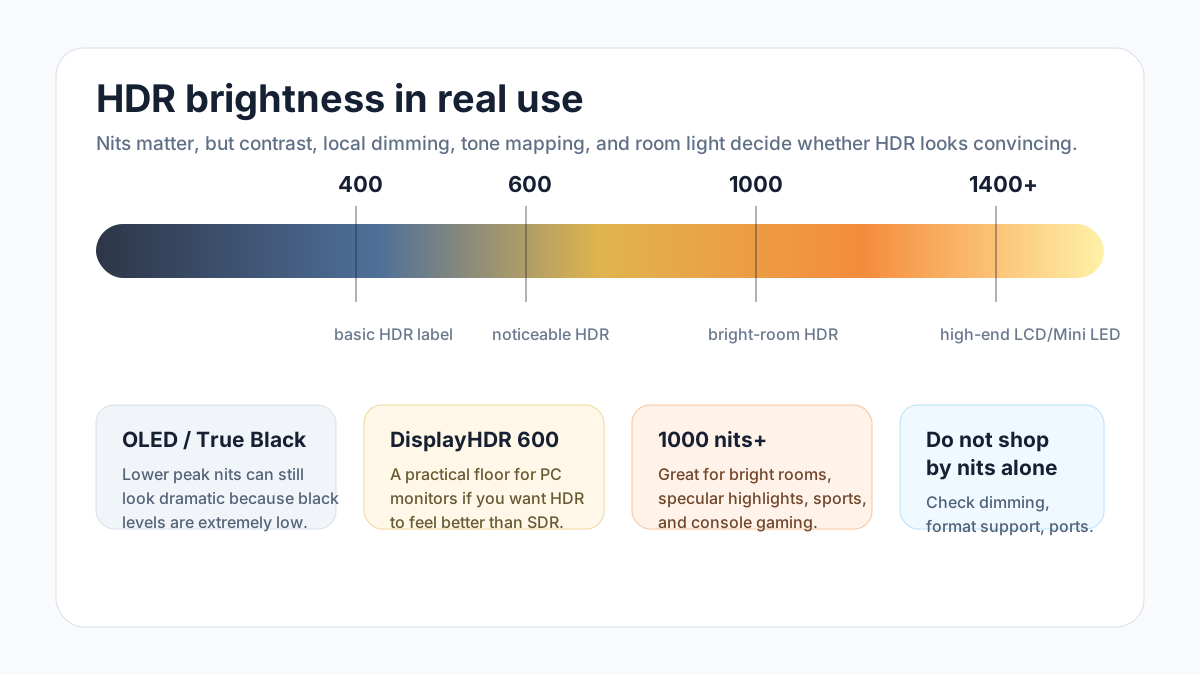
For most buyers, 600 nits is the point where HDR starts to feel meaningfully different on a monitor, while 1000 nits or more is the safer target for bright-room TVs and console gaming. OLED can look excellent at lower peak brightness because its black level is so low.
HDR brightness targets by use case
| Use case | Target | What it means |
|---|---|---|
| Basic HDR support | 400 nits | Accepts HDR, but highlights may not look much better than SDR. |
| Noticeable HDR monitor | 600 nits with local dimming | A good minimum for HDR to feel like an upgrade on a desk. |
| Bright-room TV or gaming | 1000 nits or more | Helps bright highlights survive room light and tone mapping. |
| OLED or True Black HDR | 400-600 nits can still work | Perfect blacks can make lower peak brightness look more dramatic. |
| HDR creation or very bright rooms | 1000-1400+ nits | Useful when you care about highlight headroom, not just HDR compatibility. |
Nits are only one part of HDR. Local dimming, black level, tone mapping, color volume, and room brightness can change the result.
What HDR brightness really means
HDR is not just a brighter picture. HDR content carries brightness information in a more absolute way than SDR, so the display is trying to preserve dark scenes, bright highlights, and color volume at the same time. If the display cannot get bright enough, it has to compress the image through tone mapping.
HDR10, HDR10+, Dolby Vision, and HLG
HDR formats describe the signal and metadata. They do not guarantee that a specific TV or monitor will look good. A dim display with Dolby Vision can still look flat, while a bright display with good tone mapping can make basic HDR10 look impressive.
HDR formats in practical terms
| Format | Metadata | Buying note |
|---|---|---|
| HDR10 | Static metadata | Most common baseline. Good tone mapping matters a lot. |
| HDR10+ | Dynamic metadata | Can adjust scene by scene, but device and app support varies. |
| Dolby Vision | Dynamic metadata | Often best for movies and streaming when the TV supports it well. |
| HLG | Broadcast-friendly | Mostly relevant for live TV and broadcast workflows. |
OLED vs Mini LED vs QLED for HDR
OLED is strongest when you watch in a dim room and care about black level, shadow detail, and no blooming. Mini LED and strong full-array LCD TVs are better when you watch in a bright room, want very high peak brightness, or need a large screen for sports and HDR gaming.
QLED is a color filter and quantum-dot marketing term, not a backlight type by itself. A QLED TV can be edge-lit, full-array, or Mini LED, so check the actual dimming system and brightness test, not just the QLED label.
HDR gaming: refresh rate, VRR, and HDMI ports
For PS5, Xbox Series X, and modern gaming PCs, look for 4K 120Hz support, VRR, ALLM, and enough full-bandwidth HDMI ports for your devices. HDMI 2.1 class features matter more for gaming than for movies because games combine HDR with high refresh rate and low latency.
- 4K 60Hz HDR is enough for movies and casual console play.
- 4K 120Hz with VRR is the better target for PS5, Xbox Series X, and gaming PCs.
- Check the number of full-speed ports, not only the HDMI version printed on the box.
Buying checklist for HDR TVs and monitors
The best HDR display is not always the one with the largest nit number. A balanced spec sheet should match your room, content, and source devices. If you mostly watch movies at night, contrast and tone mapping may matter more than raw brightness. If you watch sports in daylight, brightness and anti-glare matter more.
- For monitors, treat DisplayHDR 400 as compatibility and DisplayHDR 600 as a more useful starting point.
- For TVs, check real HDR brightness, local dimming quality, reflections, and the room where you will watch.
- For gaming, confirm refresh rate, VRR, ALLM, input lag, and HDMI port bandwidth.
FAQ
Is 400 nits enough for HDR?
400 nits is enough to accept an HDR signal, but it often looks like mild HDR unless the display has excellent black levels. For monitors, 600 nits with local dimming is a better practical target.
Is OLED better than Mini LED for HDR?
OLED is better for deep blacks and dark-room contrast. Mini LED is often better for very bright rooms and high peak brightness. The better choice depends on where you watch and whether you value black level or brightness more.
Do I need Dolby Vision?
It is nice to have, especially for streaming and movies, but it is not the only thing that matters. Brightness, contrast, local dimming, and tone mapping can matter more than the logo.
Do I need HDMI 2.1 for HDR?
Not for movies or 4K 60Hz HDR. HDMI 2.1 class features matter more when you want 4K 120Hz, VRR, ALLM, or a gaming PC/console setup with low latency.
Is DisplayHDR 400 real HDR?
It is a real certification tier, but it is the entry level. It confirms a basic capability, not a dramatic HDR experience. DisplayHDR 600, 1000, or True Black tiers are more meaningful when shopping.
What matters most for HDR gaming?
Look for brightness, local dimming or OLED contrast, 4K 120Hz, VRR, low input lag, and enough full-bandwidth HDMI ports. HDR format support is useful, but gaming feel also depends on refresh rate and latency.