Projector Installation: Plan Distance, Screen Height and Mounting
Plan a projector installation from the image backward: screen size, lens distance, usable room depth, image height and a model-specific mounting check.
Open the projector distance calculator →
Start with the screen and seating position
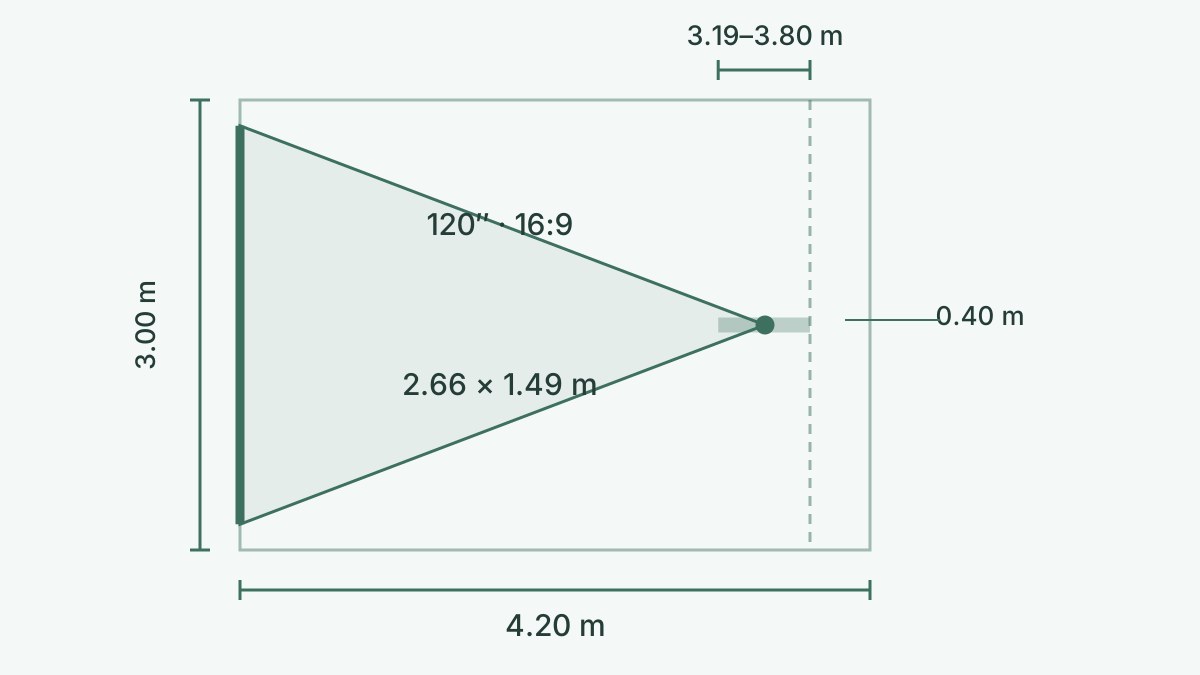
Mark the visible image on the wall with removable tape and judge it from your normal seat. Keep the frame, speakers and doors outside that rectangle. A 120-inch 16:9 image is approximately 2.66 m wide and 1.49 m high; a 100-inch image is about 2.21 × 1.25 m. The diagonal alone does not establish whether the installation fits. Seating distance is measured from your eyes, while throw distance starts at the projector lens.
Calculate the lens position and reserve space behind it
Distance = image width × throw ratio. For a 120-inch 16:9 image, width is about 2.657 m. A 1.2–1.5 lens therefore needs about 3.19–3.98 m. Divide distance by the maximum ratio to find the smallest image, and by the minimum ratio for the largest. These are rounded geometric estimates.
Measure room depth from the screen plane, not from a wall hidden behind a hanging screen. Subtract the distance from the lens to the rear of the case plus the manufacturer’s ventilation requirement and cable bend space. For example, 4.2 m minus a supplied 0.4 m allowance leaves 3.8 m for the lens. Only part of the example 3.19–3.98 m zoom range fits. The 0.4 m is an input example, not a universal clearance.
Set image height before ceiling-mount height
Image top = bottom height + image height. With a 120-inch 16:9 image and a bottom at 0.70 m, the top is about 2.19 m and the center 1.45 m. A 2.50 m ceiling leaves roughly 0.31 m above the image before adding its frame. Choose the lower edge around seated viewing, furniture and speakers; these sample heights are not recommendations for every room.
This locates the image, not the projector lens. Add frame clearance. Ceiling-mount drop and lens height require your model’s offset/lens-shift diagram.
Use optical placement; verify offset and lens shift
Find the installation diagram for the exact projector, lens and mounting orientation. Offset and lens-shift percentages are not interchangeable: the reference may be image center or an image edge, and horizontal and vertical shift limits may interact. Keep the lens within the specified envelope. Digital keystone can reshape the picture but is not a replacement for the required optical distance and can reduce usable image detail.
Check the mount, cables and ventilation before fixing
Use the specified mounting points, compatible screw dimensions and an attachment method suitable for the building surface and complete load. A universal distance calculator cannot specify an anchor or screw for your ceiling. Follow the projector and mount manuals, and use a qualified installer where the structure or wiring is uncertain. Route cables with connector and bend clearance; confirm the source-to-projector signal at the intended resolution before concealing the run. Keep every intake and exhaust clear according to the model’s manual.
Test the complete setup, especially ultra-short throw
Very short throw: lens-based arithmetic does not locate the cabinet or screen height. Use the exact model’s installation drawing.
Temporarily position the projector and screen at the calculated locations. Use an alignment pattern to check all four corners, focus and image position without relying on large digital corrections. Watch familiar material under your normal room lighting and test the seats, speakers and remote controls. Only finalize the mounting position when the actual optical image, frame clearance, ventilation and cables all work together.
Sources and calculation references
FAQ
Is throw distance measured from the wall or the lens?
Measure from the screen plane. Rear allowance includes the body behind the lens, ventilation and cables; use your model’s requirements. Wall width means usable image space, excluding the frame.
Does this calculate the exact ceiling-mount height?
This locates the image, not the projector lens. Add frame clearance. Ceiling-mount drop and lens height require your model’s offset/lens-shift diagram.
Can I use this for an ultra-short-throw projector?
Very short throw: lens-based arithmetic does not locate the cabinet or screen height. Use the exact model’s installation drawing.