Monitor Size Chart: Common Computer Monitor Screen Sizes
A monitor size chart for real desk decisions, covering common 16:9 and ultrawide classes with the width, height, and fit tradeoffs people usually miss.

Why monitor size charts help
A monitor size comparison chart matters because desk problems usually come from width and height, not from the diagonal number itself. It also makes it much easier to compare a normal 16:9 screen with an ultrawide that looks similar on paper but behaves very differently on a desk.
Monitor size chart (common sizes)
Compare common monitor sizes below: diagonal in centimetres, plus approximate visible width and height in inches and centimetres.
27-inch 16:9: 68.58 cm diagonal; visible width × height approximately 59.8 × 33.6 cm.
32-inch 16:9: 81.28 cm diagonal; visible width × height approximately 70.8 × 39.8 cm.
34-inch 21:9: 86.36 cm diagonal; visible width × height approximately 79.4 × 34.0 cm.
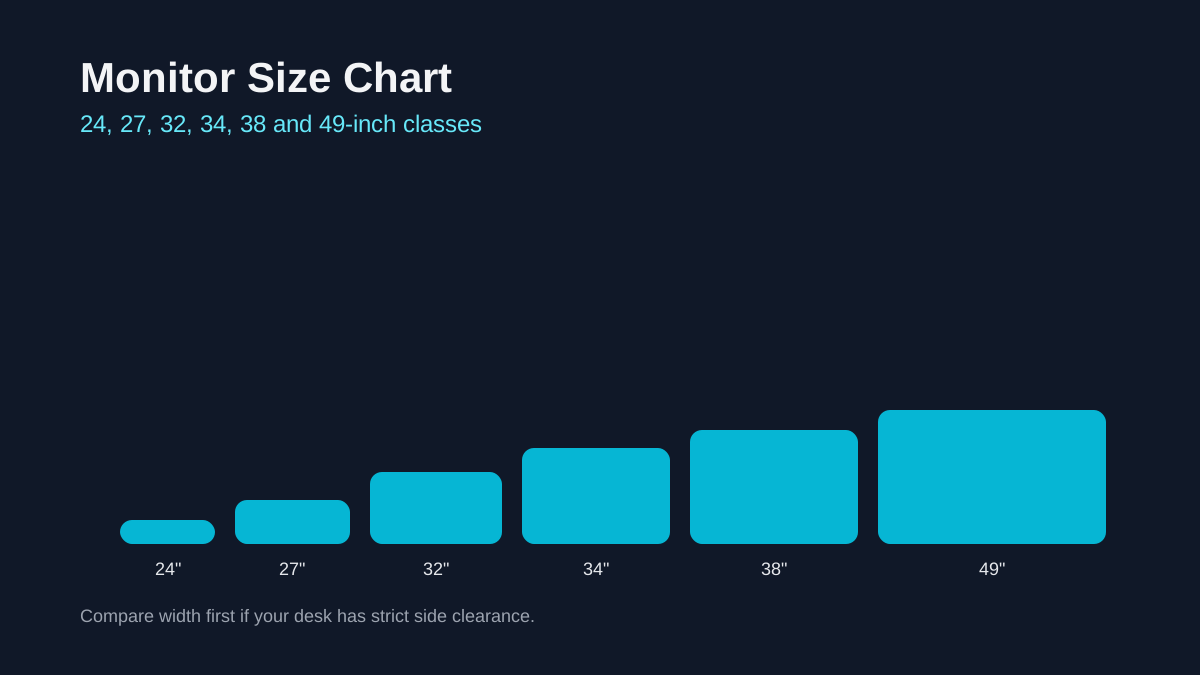
Common monitor sizes and dimensions
| Size & ratio | Diagonal | Width (approx.) | Height (approx.) |
|---|---|---|---|
| 19 inch (16:9) | 48.26 cm | 16.6 in / 42.1 cm | 9.3 in / 23.7 cm |
| 22 inch (16:9) | 55.88 cm | 19.2 in / 48.7 cm | 10.8 in / 27.4 cm |
| 24 inch (16:9) | 60.96 cm | 20.9 in / 53.1 cm | 11.8 in / 29.9 cm |
| 25 inch (16:9) | 63.50 cm | 21.8 in / 55.3 cm | 12.3 in / 31.1 cm |
| 27 inch (16:9) | 68.58 cm | 23.5 in / 59.8 cm | 13.2 in / 33.6 cm |
| 28 inch (16:9) | 71.12 cm | 24.4 in / 62.0 cm | 13.7 in / 34.9 cm |
| 32 inch (16:9) | 81.28 cm | 27.9 in / 70.8 cm | 15.7 in / 39.8 cm |
| 34 inch (21:9) | 86.36 cm | 31.3 in / 79.4 cm | 13.4 in / 34.0 cm |
| 38 inch (21:9) | 96.52 cm | 34.9 in / 88.7 cm | 15.0 in / 38.0 cm |
| 40 inch (21:9) | 101.60 cm | 36.8 in / 93.4 cm | 15.8 in / 40.0 cm |
| 45 inch (21:9) | 114.30 cm | 41.4 in / 105.1 cm | 17.7 in / 45.0 cm |
| 49 inch (32:9) | 124.46 cm | 47.2 in / 119.8 cm | 13.3 in / 33.7 cm |
The inch size is the diagonal, not the screen width. Width and height are estimates for the visible panel, calculated from the nominal diagonal and the listed aspect ratio. Bezels, stands and arms are excluded. Actual models, including ultrawides, may use slightly different dimensions or ratios; check the manufacturer’s measurements before installation.
24 vs 27 vs 32: the classic decision
If you sit 20-30 inches from your screen, 24 to 27 inches often feels balanced. Moving up to 32 inches is great for immersive work or gaming, but it benefits from a slightly deeper desk or a monitor arm.
Ultrawide and super ultrawide sizes
Ultrawide monitors (34-38 inch, 21:9) feel like two smaller screens fused together. Super ultrawide 49-inch screens (32:9) can replace dual-monitor setups but require more desk space.
Match size with resolution
As screens get larger, resolution matters more. A 27-inch monitor often looks crisp at 1440p, while 32-inch and ultrawide screens benefit from higher resolutions. The goal is comfortable text size without scaling extremes.
Desk distance and ergonomics
Ergonomic guidance typically suggests keeping your eyes about 20-40 inches from the screen. Use that range to decide between 27 and 32 inches, or to determine whether a 49-inch ultrawide will feel overwhelming.
Single vs dual monitor setups
If you already use two smaller monitors, an ultrawide can feel cleaner and remove the gap in the middle. On the other hand, dual 27-inch screens often offer more total area and easier window snapping. Use the size chart to estimate the full width your desk can handle.
Gaming vs office work
For gaming, a larger screen and higher refresh rate can feel more immersive. For office work, clarity and comfortable text size matter more. That is why many people choose a 27-inch 1440p monitor for mixed use.
Productivity layouts and window management
If you often place two documents side by side, a 32-inch 16:9 monitor or a 34-inch ultrawide can feel more natural. They reduce constant window switching and give you more horizontal space for timelines and spreadsheets.
For coding or writing, a taller screen can reduce scrolling. In that case, a 27-inch or 32-inch 16:9 panel may feel more balanced than an ultrawide with less height.
If your work relies on color accuracy or design tools, consider panel quality and calibration alongside size. A slightly smaller but higher-quality panel can be better than a larger screen with uneven color or brightness.
Quick decision checklist
Use this list when deciding between 27-inch, 32-inch, and ultrawide classes.
- Measure desk depth before comparing specs.
- Match resolution to panel size for readable text.
- Choose by primary workload, not only by trend.
Common mistakes to avoid
Do not compare diagonal numbers alone. Width, height, and viewing distance are what determine comfort and productivity over long sessions.
Required width = layout span + both reserved margins. Negative clearance means a boundary is crossed. This is a width check, not a stand or mounting check.
How much desk width do two monitors need?FAQ
What are the most common computer monitor screen sizes?
For standard 16:9 monitors, 24, 27, and 32 inches are still the sizes most people cross-shop. Once you move into ultrawide territory, 34 inches is usually the first stop.
Is a 34-inch ultrawide bigger than a 32-inch 16:9?
A 34-inch 21:9 screen is wider but shorter than a 32-inch 16:9 screen. It feels wider for multitasking but not taller.
How far should I sit from a 32-inch monitor?
Many people find 24-36 inches comfortable, depending on resolution and text size preferences.
Related comparisons
Related guides
Laptop display guides
Laptop Screen Size Guide: Dimensions & Comparison Chart
Monitor guides
Monitor PPI Chart by Size and Resolution
Monitor guides
Monitor Resolution Guide: 1080p, 1440p, and 4K Picks
Monitor guides
27 vs 32 Inch Monitor: Which Size Is Better for Work and Gaming?
Monitor setups
Ultrawide vs Dual Monitors: 34-Inch and 49-Inch Setups